This article explains how API usage is billed on Easyship, what's included in your plan, and how to monitor your usage in your dashboard.
Overview
All Easyship subscription plans include a monthly allocation of API calls per endpoint. You only pay extra if you exceed your included limit and even then, your access is never blocked.
The following endpoints are available across plans:
- 3rd Party Tracking
- Tax & Duties Calculations
- HS Code Calculation
- Rates
- Address Validation (non-US)
- Address Validation (US)
Included Limits
Each plan comes with a set number of API calls per endpoint per month. Your allocation resets on your subscription renewal date each month.
What counts toward your limit: Only successful API calls count. Failed requests are not counted or charged.
Enterprise customers: API usage is tracked but not charged.
Overage Charges
If you exceed your included limit for any endpoint, you'll be charged a per-call overage rate for the additional usage. Your access is never blocked — your integration keeps working and overage charges are added to your next monthly invoice. Note that a valid payment card must be on file for this to apply.
Standard rate limits still apply across all plans to ensure system stability.
Billing Cycle
API usage charges are billed monthly and align with your subscription renewal date.
- Monthly plans: billed on your renewal date each month
- Annual plans: API usage is still billed monthly, not annually
Example: If you signed up on 2 June on an annual plan, your API usage will be billed on the 2nd of every month.
Annual subscribers: your monthly API usage invoice is separate from your annual subscription fee.
API Scopes
Scopes define what endpoints and functionality an API connection has access to. Some scopes are user-controlled, while others are managed by Easyship.
When setting up an API integration, you'll choose between two API versions:
- 2023-01 or earlier (legacy): Scopes are listed without specific actions — enabling a scope grants both read and write access to all relevant endpoints within that scope.
- 2024-09 or later (recommended): Scopes use the format <scope>.<resource>:<action> (e.g. public.address:read). This gives you more granular control.
How to create an API integration
- Log in to your Easyship account at app.easyship.com
- Click New Integration under Connect in the sidebar
- Click API Integration at the bottom of the page
- Fill in the details and select your preferred API version
- Click Connect
How to view or edit scopes
- Log in to your Easyship account at app.easyship.com
- Select your API connection under the Connect tab in the sidebar
- Under API Access Token, you can see which scopes the token has access to
- To make changes, click Edit, select or deselect scopes as needed, then click Save
If you need access to additional scopes for advanced functionality or beta features, contact your account manager or reach out via Easyship Support.
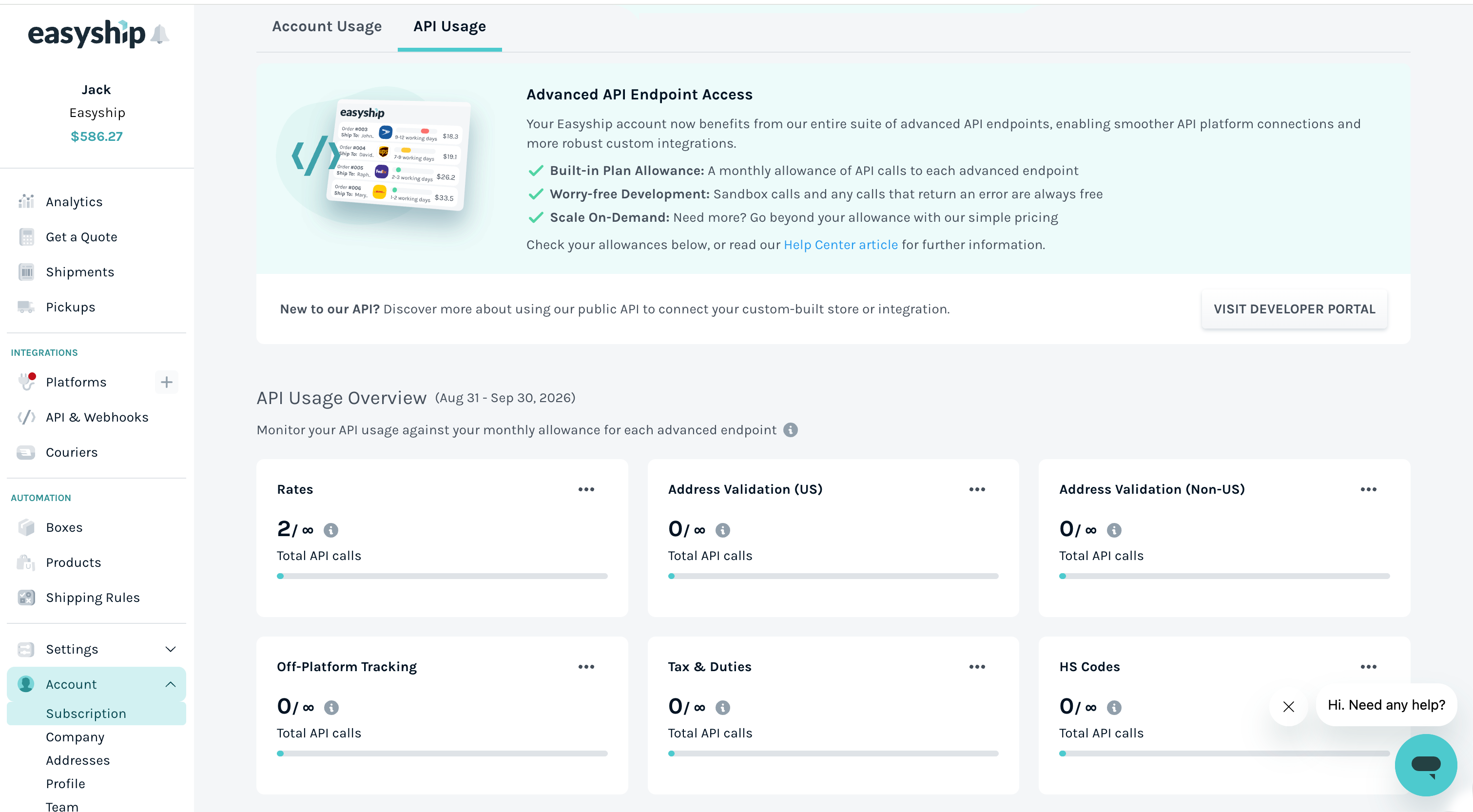
Viewing Your Usage
- Log in to your Easyship account
- Go to Subscription in your account settings
- Select the API Usage tab
Here you'll see:
- All endpoints available on your plan
- Calls used vs. your included limit per endpoint
- Overage charges accrued for the current period
- API calls used broken down by individual API connection
- Which platforms are connected and which APIs are active
Usage data refreshes approximately every 15 minutes.
Understanding Your Invoice
API usage charges appear as line items on your monthly invoice, with a detailed breakdown showing:
- API calls per endpoint
- Included vs. overage usage
- Total charges per endpoint
To view your invoices, go to Subscription > Billing in your account settings.
FAQs
Will my access be blocked if I hit my limit?
No. Your integration continues to work uninterrupted. Overage charges for any calls beyond your included limit will appear on your next monthly invoice.
Will I be notified when I'm approaching my limit?
Yes. You'll receive alerts at 90% and 100% of your included usage for each endpoint.
I'm on an annual plan — why am I receiving monthly charges?
API usage charges are billed monthly regardless of your subscription type. These are separate from your annual subscription fee and will appear as distinct line items each month.
What happens if I downgrade my plan?
Your included API limits will adjust to your new plan level immediately. If you were using scopes only available at a higher tier, you'll lose access to those scopes. A new billing period starts with your new plan.
Do Enterprise customers pay for API usage?
No. Enterprise API usage is tracked for visibility but is not charged.
I need more API calls than my plan includes. What are my options?
If your usage consistently exceeds your plan's included limits, consider upgrading your subscription. If standard plans don't meet your volume needs, contact our team — we can create a custom plan tailored to your requirements.
What happens if I don't have a payment method on file?
A valid payment method is required for paid endpoint access. If none is on file, you'll see the error: "Payment method required for paid endpoint access." Add a payment method in your billing settings to restore access.
What if my subscription payment fails?
If your payment fails, paid endpoint access may be restricted. Update your payment method in billing settings and retry the payment, or contact our support team for help.